Camouflage Seamless Patterns
Camouflage seamless patterns offer a practical, versatile foundation for designers and creators who need authentic, scalable texture assets—without the constraints of raster limitations or inconsistent tiling. This particular set stands out not because it reinvents camouflage aesthetics, but because it delivers technical reliability where many similar resources fall short: true seamlessness, format diversity, and thoughtful production for real-world use.
What You’re Actually Getting
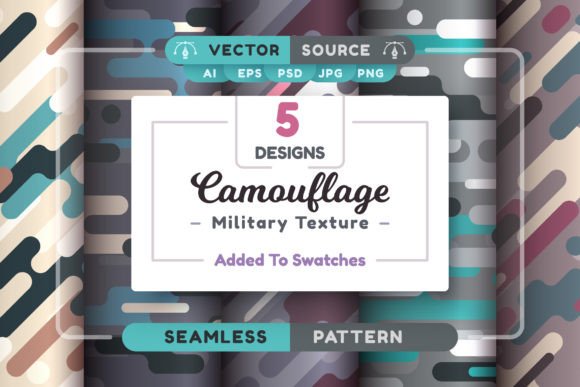
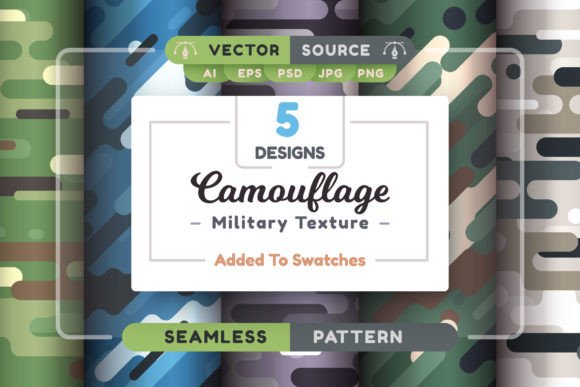
The package includes five distinct camouflage seamless patterns—each carefully constructed to repeat flawlessly across any surface, whether applied to apparel mockups, packaging backgrounds, UI overlays, or large-format print. Unlike low-resolution JPEGs or poorly aligned tile sets found in free asset libraries, these patterns were built with vector precision first, then exported into multiple high-fidelity raster formats without interpolation loss.
The archive contains:
- 5 AI files (Adobe Illustrator CC 2014+ compatible) — fully editable vectors with layered swatches and pattern definitions
- 5 EPS files (Illustrator 10+) — backward-compatible for legacy workflows or print service providers requiring EPS
- 5 JPG files — 4167×4167 px, sRGB, optimized for web previews and quick placement
- 10 PNG files — same resolution, with transparent and opaque variants (useful for layering over photos or gradients)
- 5 PSD files — 4167×4167 px, multi-layered with blending options and non-destructive adjustment layers
Included documentation clarifies how each file type behaves in common applications—not just “how to open,” but how to scale, recolor, or re-tile without breaking continuity. There’s also a dedicated .pat file for Photoshop users who rely on native pattern fills, plus a lightweight .ai graphic style library that applies consistent stroke, opacity, and texture overlays with one click.
Why Seamlessness Matters Beyond Aesthetics
A truly seamless camouflage pattern isn’t just about visual continuity—it’s about workflow efficiency. When a pattern repeats cleanly at any scale or orientation, you avoid manual patching, cloning, or alignment corrections mid-project. That saves time during prototyping, client revisions, or batch exports—especially when applying textures across variable dimensions like banners, merch templates, or responsive web elements.
These patterns hold up under extreme scaling: enlarging an AI or EPS file to cover a 3m×2m trade show backdrop introduces no pixelation or visible seams. Likewise, shrinking the same vector down to a 24px icon background preserves clarity. That flexibility matters most for professionals juggling multiple output requirements—freelancers preparing assets for both digital ads and embroidered patches, educators building scalable learning materials, or small business owners designing branded merchandise across platforms.
Real-World Usability Across Tools and Teams
The inclusion of AI, EPS, PSD, PNG, JPG, and .pat files reflects an understanding of actual studio environments—not idealized ones. Illustrator users can modify base colors, adjust line weight, or isolate individual camo elements using the vector paths. Photoshop users benefit from layered PSDs that allow luminance masking, gradient overlays, or selective desaturation—all while preserving tile integrity. Even non-designers (e.g., marketers inserting assets into Canva or Figma via PNG imports) get clean, high-res versions ready for immediate use.
One practical advantage is consistency across collaborative projects. If a brand guideline specifies a custom camouflage tone, the AI files let a designer adjust global swatches once—and all five patterns update accordingly. That avoids version drift when multiple people apply “similar but not identical” textures across presentations, social assets, or email headers.
Quality Assessment: Where It Delivers—and Where Caution Applies
Each pattern was tested for tiling integrity at 200%, 500%, and 1000% zoom in both Illustrator and Photoshop. No visible joins, misaligned edges, or color shifts occurred across any of the five designs. The raster exports maintain sharpness thanks to lossless resampling during export—not upscaled interpolation. That level of fidelity is uncommon in budget-friendly pattern packs.
That said, Camouflage Seamless Patterns doesn’t include animated variants, 3D-ready PBR maps, or generative variations. It’s a focused, static set—not a full texture ecosystem. Users needing photorealistic fabric simulation, displacement maps, or AR-ready GLB exports will still need supplemental tools. Similarly, while the documentation covers core usage, it doesn’t walk through advanced scripting (e.g., automating pattern swaps across hundreds of files), nor does it include pre-built mockups—those remain separate workflow decisions.
Who Benefits Most—and How
Freelance graphic designers preparing branding packages for outdoor gear startups find immediate value: applying one of these patterns to a logo lockup, apparel template, or presentation slide adds cohesion without licensing risk. Educators creating geography or military history visuals can use the neutral tones and scalable resolution to illustrate terrain concepts clearly—even on projector displays.
Small business owners selling tactical accessories, survival kits, or custom apparel appreciate the absence of watermarks, attribution requirements, or usage caps. Since the AI and EPS files are editable, they can match exact brand Pantones or adapt patterns to fit curved product surfaces (e.g., water bottles or holsters) using Illustrator’s envelope distort tools.
Bloggers and content creators covering design tools or creative workflows may use the PSD versions to demonstrate non-destructive texturing techniques—applying the camouflage overlay as a smart object, then adjusting blend modes or opacity to show contrast with typography. The included PNGs with transparency simplify this kind of tutorial creation.
Integration Into Existing Workflows
No special plugins or subscriptions are required. The files behave predictably in standard Adobe applications. For example, dragging an AI pattern into an Illustrator document auto-registers it in the Swatches panel. In Photoshop, installing the .pat file lets users access the patterns instantly via Edit > Fill > Use Pattern. The PSD files open with organized layer groups—Base Texture, Overlay Grain, Color Adjustment—so modifications stay modular.
If your team uses Figma or Affinity Designer, the PNG and JPG exports integrate cleanly. While vector editing isn’t possible outside Adobe apps, the resolution (4167×4167 px) ensures crisp rendering even at 2x or 3x display densities. For developers embedding textures into CSS backgrounds or SVG filters, the high-res raster files provide reliable fallbacks where vector support is limited.
A Final Note on Long-Term Utility
This isn’t a trend-dependent download. Camouflage as a motif appears consistently across industries—from defense contracting and emergency services to fashion and gaming UI—because it conveys durability, discretion, and adaptability. These patterns avoid overly stylized or dated interpretations (no neon splatter or cartoonish pixelation), opting instead for grounded, field-tested proportions and tonal balance. That increases reuse potential across years, not just seasons.
Because the source files are vector-based and well-structured, updating them for future software versions—or adapting them for new output standards like HDR displays or variable fonts—is straightforward. You’re not locked into a single interpretation; you’re equipped with editable, scalable foundations that respond to evolving needs.