Patterns Sweets Digital Paper Collection
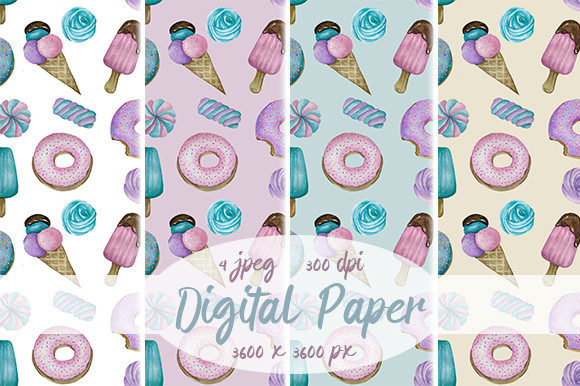
Imagine having four ready-to-use, high-resolution digital papers—each bursting with playful sweetness: pastel donuts, creamy scoops of ice cream, soft watercolor textures, and charming confectionery motifs—all designed to tile seamlessly. That’s exactly what the Patterns Sweets, Digital Paper collection delivers. No clipping masks needed. No awkward repeats. Just beautiful, professional-grade JPEG files sized at 3600×3600 pixels and optimized at 300dpi for crisp printing and smooth digital use.
What Makes This More Than Just Pretty Backgrounds?
This isn’t generic clipart or low-res web graphics. Each pattern in the Patterns Sweets, Digital Paper set is hand-crafted with intentional spacing, balanced color weight, and true seamlessness—meaning it repeats infinitely without visible edges or breaks. The watercolor base adds subtle texture and organic charm, while the donut and ice cream elements bring lighthearted energy without overwhelming the design. It’s the kind of resource that works as well on a birthday card as it does on a boutique product label.
Who Benefits—and Why?
Creatives building their first Canva brand kit will appreciate how quickly these papers elevate social posts or email headers. Small business owners launching a new bakery, candy shop, or kids’ activity brand can use them to unify packaging, website banners, and printable stickers—all while keeping production costs low. Educators designing classroom reward charts or summer camp handouts find the cheerful motifs instantly engaging for students. Even freelancers crafting client presentations or pitch decks use these patterns to add warmth and personality without sacrificing polish.
Real-World Uses You Can Start Today
- Print projects: Use one of the four patterns as a background for greeting cards, gift tags, recipe cards, or custom stationery—print at home or send to a local print shop with confidence thanks to the 300dpi resolution.
- Digital design: Drop a pattern into Photoshop or Illustrator as a fill layer behind text, or use it as a subtle overlay in Procreate for hand-lettered quotes or social media graphics.
- Web & branding: Apply a scaled-down version as a CSS background on a Shopify product page or blog sidebar—just remember to test tile behavior across devices.
- Educational materials: Teachers use these to create themed worksheets, behavior charts, or bulletin board borders that feel joyful but still look intentional—not “clipart-y.”
- DIY crafts: Import into Cricut Design Space or Silhouette Studio to layer behind vinyl cutouts, or use as a textured backdrop for printable party invites and cupcake toppers.
Why Seamless Matters (Especially for Beginners)
If you’ve ever tried tiling a non-seamless image, you know the frustration: obvious lines, mismatched edges, or repeated elements that draw attention instead of supporting your message. With Patterns Sweets, Digital Paper, the repeat is built-in and tested—so whether you’re filling a full A4 sheet or a tiny 2×2 inch sticker, the flow stays natural. That reliability saves time, reduces trial-and-error, and helps beginners produce pro-level results faster—even without advanced design skills.
A Note on Color Accuracy
These patterns were created with care using calibrated monitors and standard RGB profiles—but keep in mind that colors may appear slightly different on your screen versus someone else’s, or when printed. That’s normal across all digital design work. If precise color matching is essential (e.g., for brand consistency), consider ordering a physical proof from your printer before a large run. For most personal, digital, or small-batch uses, the soft, inviting palette holds up beautifully across devices.
Getting the Most From Your Files
All four patterns come as individual JPEG files—no ZIP extraction headaches or software compatibility worries. They open in virtually any image editor, design app, or even basic tools like Preview or Paint. Since they’re high-resolution, you can scale them down freely for web use (to reduce file size) or keep them full-size for premium prints. Just avoid stretching or skewing the images—that can distort the delicate watercolor grain and break the seamless effect.
Thoughtful Design Choices Behind the Scenes
The balance between whimsy and usability was intentional. Too many sweets motifs can feel childish; too few lose the charm. These patterns strike a middle ground: the donuts are stylized—not cartoonish—the ice cream scoops are softly blurred at the edges, and the watercolor base provides visual breathing room. That makes them flexible enough for adult audiences (think café menus or wellness retreat branding) while still delighting younger viewers.
Before You Download: A Few Practical Tips
- Check your software’s tile settings: In Photoshop, use “Pattern Overlay” or “Define Pattern” for best results. In Canva, upload as an image and select “Tile” under position options.
- Don’t overcomplicate layering: Try pairing one pattern with clean, sans-serif type and minimal embellishment—it lets the sweetness shine without clutter.
- Think beyond backgrounds: Flip the script—use a cropped section as a decorative border, or invert colors for a fun negative-space effect.
- Test before committing: Apply a pattern to a mockup of your final format (e.g., a phone screen or business card template) to see how it reads at real-world size.
More Than a Trend—A Thoughtful Creative Tool
Patterns Sweets, Digital Paper isn’t about chasing trends. It’s about giving creators—whether they’re launching their first Etsy shop or designing a school fundraiser flyer—a reliable, joyful, and versatile foundation. It bridges the gap between handmade charm and digital efficiency. You get the warmth of watercolor and confectionery playfulness, paired with the precision and flexibility modern design demands.
Whether you're sketching ideas on paper or building a full brand identity, having these four patterns on hand means less time hunting for assets—and more time bringing your vision to life.