Vintage Floral Patterns: Practical Integration for Designers, Crafters, and Small Business Owners
Vintage floral patterns are more than decorative motifs—they’re functional design assets that anchor visual storytelling across physical and digital projects. When sourced with intention—like the Valentines Shabby Chic Flowers Digital Paper Pack—they become workflow accelerators: consistent, high-resolution, and purpose-built for real-world use. This isn’t about nostalgia for its own sake. It’s about having reliable, printable-ready resources that reduce friction in execution—whether you’re designing wedding invitations at 10 p.m., prepping a client’s baby shower collage sheet, or building a cohesive brand mood board for a boutique stationery line.
Where Vintage Floral Patterns Fit in Your Creative Workflow
Vintage floral patterns function most effectively when treated as infrastructure—not just decoration. They slot into three key phases of a project:
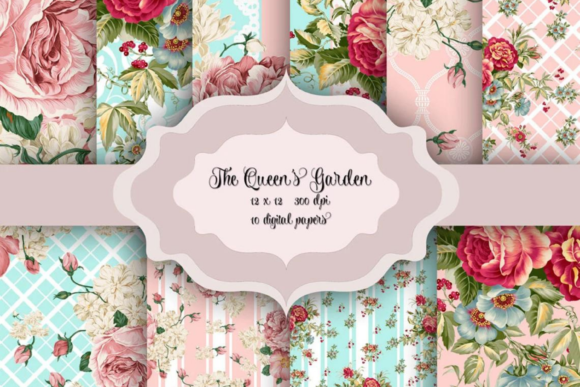
- Pre-production: Used to establish tone, test color harmony, and align stakeholders. A pink-and-mint vintage floral background helps clients visualize warmth and softness before committing to full layout designs.
- Production: Served as base layers, overlay textures, or collage elements. Because these 12×12 inch (3600×3600 pixel) JPEGs are delivered at 300 DPI, they scale cleanly across print formats—from 5×7 invitation suites to large-format party banners—without reworking resolution or upscaling artifacts.
- Post-delivery: Repurposed across asset libraries. A single floral paper can become a social media story background, an email newsletter divider, or a subtle watermark for digital product packaging—extending ROI without additional design time.
This flexibility depends on consistency in format and quality. The ZIP folder delivery ensures immediate access, no subscription, no watermarks—and no need to hunt for compatible file types. That matters when you’re juggling multiple clients or launching seasonal collections on tight deadlines.
Compatibility and Cross-Platform Use
These vintage floral patterns work natively in widely used tools: Adobe Photoshop and Illustrator (for layering and vector masking), Canva (via upload), Affinity Designer, and even Microsoft PowerPoint for quick presentation decks or pitch materials. Because they’re JPEGs—not PSDs or layered files—they load instantly, require no special plugins, and avoid version conflicts common with proprietary formats.
For scrapbookers and educators, compatibility extends beyond software. These papers print cleanly on standard inkjet and laser printers, including home-office models. No color calibration headaches: the pink mint palette is balanced for accurate reproduction on matte and glossy cardstock alike. For wedding planners coordinating with local print shops, the 300 DPI resolution meets industry standards—eliminating back-and-forth on file readiness.
When paired with complementary assets—like digital lace overlays, hand-drawn flourishes, or scanned antique paper textures—vintage floral patterns form a cohesive system. You’re not just adding “a flower.” You’re reinforcing a stylistic logic: soft edges, muted saturation, organic asymmetry. That coherence builds trust, especially for small businesses where every visual touchpoint contributes to perceived professionalism.
Practical Implementation: From File to Finished Output
Here’s how users integrate this pack efficiently:
- Organize by use case, not just color: Create folders named “Invitations,” “Collage Sheets,” “Social Assets,” and “Print-Ready Backdrops.” Rename files descriptively (e.g., “vfp-pinkmint-roses-softedge.jpg”) instead of relying on generic numbering. This saves minutes per project—and hours over a season.
- Test contrast early: Vintage florals often feature low-contrast palettes. Before setting type, place white or charcoal text over a sample swatch and check legibility at 100% zoom. Adjust opacity or add subtle drop shadows only when needed—preserving the shabby chic aesthetic without sacrificing readability.
- Batch-resize for multi-format output: Use free tools like ImageMagick or built-in OS automation (macOS Shortcuts / Windows Power Automate) to generate web-optimized versions (1200px wide, sRGB) alongside print-ready originals. Keep both in sync—no accidental web files going to press.
- Embed in templates, not individual files: In Canva or Figma, build reusable invitation or collage templates with locked background layers. That way, swapping one floral paper updates all instances—maintaining consistency while allowing rapid variation.
Quality Control and Long-Term Usability
High-resolution JPEGs at 300 DPI aren’t just about sharpness—they support future-proofing. As screen densities increase and print expectations rise, starting with a 3600×3600 pixel base gives room to crop, rotate, or tile without degradation. Unlike low-res PNGs or stretched SVGs, these files retain fidelity whether scaled down for Instagram posts or enlarged for framed wall art.
Consistency across the 10-pattern set matters too. Each design shares the same light direction, tonal range, and spacing logic—meaning they mix seamlessly in collages or mood boards. There’s no visual whiplash between a delicate rose motif and a bolder stripe flourish. That cohesion reduces decision fatigue during layout stages and supports faster client approvals.
Long-term, treat these as modular components—not one-off downloads. Store them in a cloud-synced asset library with clear metadata (color hex codes, dominant motif, ideal use cases). Tagging lets you filter by “pink,” “lace-inspired,” or “baby shower” in seconds—turning search from a chore into a precision tool.
Real-World Applications Across Roles
A freelance graphic designer uses the mint-and-rose papers to build a branded invitation suite for a micro-wedding client—then repurposes the same background as a subtle texture behind service icons on the couple’s wedding website. No new illustrations needed.
A small-batch candle maker prints the floral patterns onto kraft gift tags and belly bands, creating continuity between product packaging and Instagram Stories. The tactile feel of printed paper reinforces brand authenticity better than flat digital graphics alone.
An educator preparing a history-of-design unit imports the papers into Google Slides, using them as contextual backdrops behind timelines of Art Nouveau and Victorian typography. Students grasp stylistic evolution visually—not just through lecture notes.
Each use case relies on the same foundation: resolution integrity, color accuracy, and intentional design language. Vintage floral patterns don’t replace skill—they amplify it by removing repetitive setup tasks and ensuring visual alignment from concept to delivery.
Preparing for Smooth Integration
Before downloading or purchasing, confirm your intended outputs: Will you print? Share digitally? Layer in video edits? If print is primary, verify your printer’s recommended color profile (usually sRGB for web-to-print services, Adobe RGB for professional labs). If digital-only, convert a few samples to web-safe JPEGs and preview on mobile devices—some vintage palettes shift under different lighting conditions.
Also consider licensing scope. This pack permits commercial use—including resale of physical products like printed invitations or craft kits—so long as the files aren’t redistributed as standalone digital assets. That clarity eliminates legal overhead when scaling from hobby to side-hustle to full-time business.
Vintage floral patterns succeed not because they’re “trendy,” but because they’re dependable. They meet practical constraints—resolution, compatibility, color fidelity—while supporting expressive goals. When chosen with attention to workflow fit, they become silent collaborators: always ready, consistently calibrated, and quietly elevating execution at every stage.